I’ll admit it: when I first started looking at VPNs on Android, I wasn’t exactly excited. Open an app, pick a country, tap connect, and that’s about it, right?
Well, mostly.
The more I used one, the more I started noticing the little things. Some VPN apps feel overloaded with buttons and settings you’ll probably never touch. Others make you wonder where your connection is actually going or why a perfectly ordinary website suddenly thinks you’re a robot.
That’s what made this particular service interesting to me. It takes a different approach, especially with its decentralized network and residential IPs. After spending time with it on Android, I found that the experience was less about flashy extras and more about having a bit more control over how I connect to the internet.
And in 2026, that’s becoming increasingly relevant.
Getting started on Android
The first thing I noticed was how little fuss there was around getting started.
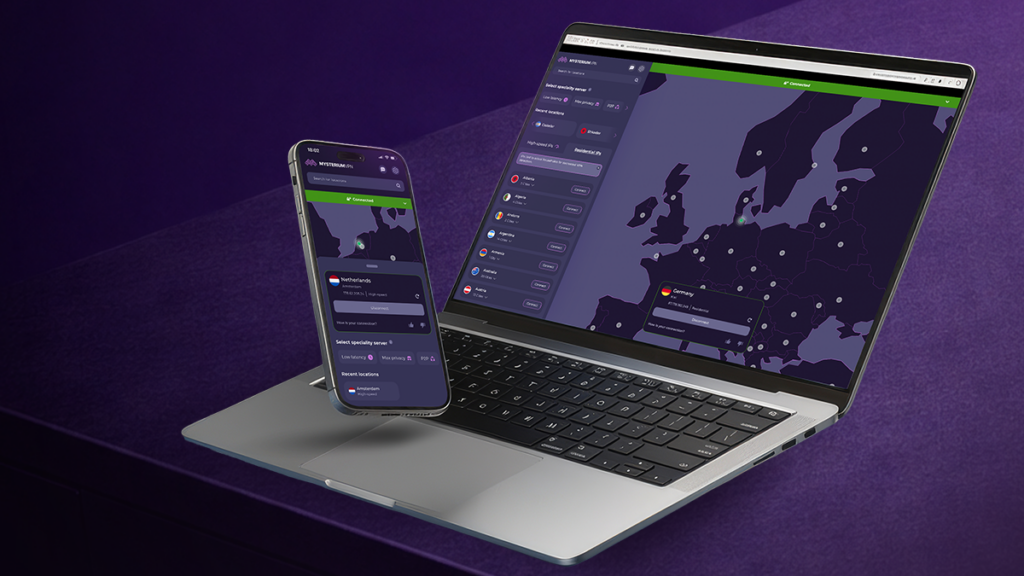
The Android app is designed for people who don't necessarily want to become amateur network engineers just to protect their connection. Pick a location, connect, and get on with whatever you were doing.
That simplicity matters more than it sounds.
I’ve used apps where there are so many options staring back at you that you start wondering whether you accidentally opened the settings menu for a spaceship. With this one, the basic experience is much easier to understand.
There are also more than 100 countries available, depending on the plan, while higher-tier subscriptions provide access to city-level location choices.
That can be handy when a country alone isn't specific enough.
Why residential IPs caught my attention
This is where things get more interesting.
A normal VPN often routes traffic through data-center servers. Residential IPs are different because they're associated with real residential internet connections. In simple terms, websites can see an IP address that looks more like the kind of connection an ordinary household might use.
I was particularly interested in this because some websites have become very good at spotting conventional VPN traffic. You know the routine: click on a page and suddenly you're greeted by a CAPTCHA asking you to identify every traffic light ever photographed.
For users looking specifically for an android vpn residential ip, residential connections can offer another option when regular VPN addresses aren't ideal.
The service currently advertises more than 7,500 residential IPs across 100+ countries. That's a sizable pool, and it fits into the broader idea behind the network: instead of everything running through one company's centralized server infrastructure, independent people around the world operate the network's exit nodes.
For context, Mysterium VPN’s residential IP network includes more than 7,500 IPs across over 100 countries. These figures help put the network’s scale into perspective, rather than leaving the numbers to speak for themselves. Of course, the total number of IPs and countries is only part of the picture: the actual experience also depends on IP availability, connection performance and how much control users have over their preferred locations.
That decentralized approach is probably the biggest difference compared with the usual VPN model.
Privacy features without making things complicated
Privacy is obviously a major reason people install a VPN for Android in the first place.
The service includes DNS leak protection and IP leak protection, which basically help prevent your real connection details from accidentally slipping through while the VPN is active.
There's also a kill switch. If the VPN connection drops, the kill switch can stop internet traffic rather than quietly letting the device fall back onto its normal connection.
That’s one of those features you might forget exists until the day you actually need it.
The service also uses WireGuard and ChaCha20 encryption, along with a no-logs approach. For anyone who isn't interested in learning the ins and outs of encryption, the simple version is that the connection is designed to keep your traffic protected without requiring you to understand what every setting does.
And yes, that's exactly how I prefer it.
The Android experience in everyday use
What I liked most was that the app doesn't force the VPN into every part of the experience.
I could connect when I wanted extra privacy, switch locations when necessary and then go back to whatever I was doing. The connection supports high upload and download speeds, and the service is designed to work across Android, iOS, Windows and macOS.
There are also browser extensions for Chrome, Brave, Opera and Opera GX, which makes the wider setup more flexible if you're someone who jumps between devices throughout the day.
Up to 15 devices can be connected simultaneously on the highest plan.
For one person, that's almost excessive. Phone, laptop, tablet, smart TV… and suddenly you're still nowhere near 15.
For a household, though, it starts making a lot more sense.
What stood out to me in 2026
The VPN market feels different now than it did a few years ago.
People are increasingly aware that online privacy isn't just about hiding from some mysterious hacker in a dark room. It's also about tracking, profiling, location-based restrictions, censorship and the enormous amount of information websites can collect about everyday browsing.
At the same time, websites have become much better at recognizing unusual traffic.
That's why residential IPs and decentralized networks are becoming more interesting. They don't magically make someone invisible, but they can provide a different type of connection than a conventional VPN server.
I also liked the fact that the service doesn't seem to be trying to win purely by throwing a hundred unnecessary features onto the screen.
The focus is fairly clear: privacy, freedom of access and a decentralized internet.
Is it one of the better Android options?
After looking at the whole package, I can see why someone searching for the best android vpn might put this service on the shortlist.
It isn't simply about changing your virtual country. The combination of Android support, residential IPs, more than 100 countries, decentralized infrastructure and privacy features gives it a slightly different identity from the standard VPN crowd.
The higher plans also offer city-level location selection and access to the residential IP pool, while the top plan supports up to 15 devices and adds a malware blocker.
There's also 24/7 support and a money-back guarantee of up to 30 days on the two-year plans, giving users some room to decide whether it actually fits their needs.
My final take
Would I recommend it to every Android user? Probably not.
If someone only wants to connect to a VPN occasionally and doesn't care about residential IPs or having a large choice of locations, a simpler plan may be enough.
But if you're looking for more flexibility, especially around residential connections and location options, I think this is where the service becomes much more interesting.
For me, the decentralized approach is the part that makes it stand out. It's not just another VPN app with a different logo and a slightly different shade of blue. There’s a bigger idea behind the network: fewer centralized gatekeepers, more independent infrastructure and a little more freedom over how people access the internet.
And honestly, that's a pretty good thing to have in your pocket.
Have you tried a residential VPN on Android before, or do you still stick with the traditional server-based approach? I’d be curious to know which one you prefer.