

Every missed call at lunch or after 5 pm is a lead that just called a competitor. That’s the real reason most small teams start shopping for a cloud phone system for small business use, and it’s the lens I used to sort these nine.
A cloud phone system runs your business calls over the internet instead of a copper line or an on-site box. No hardware closet, no IT contractor, works on the phone already in your pocket. That part is table stakes now. What actually separates these tools in 2026 is what happens after the call connects: does it record, transcribe, summarize, and drop the notes into your CRM on its own, or does it hand you a dial tone and wish you luck?
I compared nine of them on price you’ll actually pay, AI that’s included versus bolted on, how they route calls, and whether a five-person team can set it up without a project plan. Here’s the short version before the detail.
The quick answer
If you want the fast read: Allo for small, mobile teams that want AI in every plan. Dialpad if you want strong conversation AI and don’t mind a learning curve. Nextiva or RingCentral if you’re a bigger team that wants one platform for voice, video, and chat and can absorb the price. Grasshopper only if you’re a true solo operator who just needs a second number.
| Provider | Best for | Starts at* | AI included? | Free trial |
| Allo | Small AI-first sales/support teams | $18/user | Yes, every plan | 7 days |
| RingCentral | Teams with heavy integration needs | $20/user | Partly (receptionist is an add-on) | 14 days |
| Nextiva | Larger teams wanting all-in-one | $15/user | Mostly on top-tier / add-on | 14 days |
| Dialpad | Built-in call AI on a budget | $15/user | Yes, every plan | 14 days |
| Zoom Phone | Teams already living in Zoom | $10.50/user | Partial, every plan | 7 days |
| Vonage | Advanced call management | $13.99/user | Add-on (Advanced plan) | None |
| 8×8 | Contact centers, global calling | ~$24/user (quote) | Not public | By request |
| Ooma Office | Bare-bones budget setups | $19.95/user | Pro plans only | Month-to-month |
| Grasshopper | Solo operators needing a number | $14/mo | No (voicemail only) | 7 days |
*Lowest published plan, billed annually. Monthly is higher. Prices verified January–July 2026; check the vendor before you buy.
How I judged them
Four things decided the ranking, in this order.
Price you’ll actually pay, not the sticker. The headline number on a pricing page is usually the annual rate for the stripped plan. Add the AI, add a second number, add per-minute international, and the cheap-looking option often lands above one that looked twice as expensive. So I quote the real entry price and flag where the add-ons bite.
AI included versus AI as an upsell. In 2026, almost everyone lists “AI.” The question is whether call transcription, summaries, and an answering bot come with the plan or cost extra every month. That gap is where budgets get wrecked.
Setup and mobile. A small team doesn’t have an admin to configure call flows for a week. If it doesn’t work well on a phone and set up in an afternoon, it’s the wrong category for this list.
Honest trade-offs. Every tool here has a weak spot, including the one I work closest to. I said them out loud.
One note on links: this piece only links to Allo. The other eight are named and described from their own pricing pages and public reviews, not linked, so nobody reads this as a paid placement.
1. Allo — best for small, AI-first teams that live on their phones
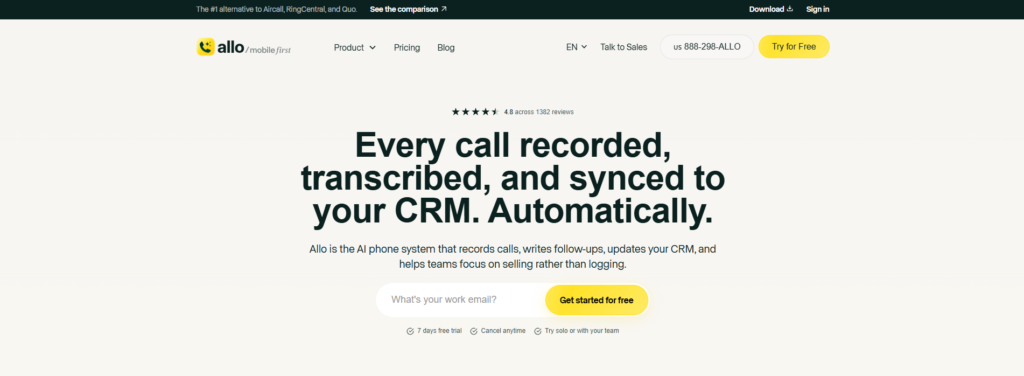
Allo is the newest name here, and that’s the point. It was built in 2024 as an AI and mobile-first phone system for small teams and salespeople, rather than a legacy platform with AI stapled on later. The founder, Jérémy Goillot, came out of the European fintech unicorn Spendesk, and the company runs from Miami, Paris, and Buenos Aires.
What stands out is that the AI comes in every plan, not as a line item. Calls get recorded and transcribed across devices, so your mobile calls are captured too. Each one gets an AI summary and follow-up draft, and an assistant lets you ask questions across your past calls and texts.
The AI receptionist answers when you can’t, handles FAQs from documents you give it, and takes down prospect details. Transcription covers 36 languages; the answering bot speaks English, Spanish, and French.
The CRM sync is the reason sales teams pick it. It pushes call recordings, transcripts, and updated contact details straight into HubSpot, Salesforce, Pipedrive, Attio, Apollo, and a dozen more, and surfaces the contact’s history when they call in. Its HubSpot listing sits at 5/5 across 200+ installs, which is not something most tools on this list can claim.
Pricing: Solo is $18/user/month billed yearly (one user, one number, unlimited national calls, call recording, AI summaries, IVR, unlimited AI receptionist). Business is $32/user billed yearly, or $45 month-to-month, and adds every integration, the power dialer, analytics, call routing, and a shared inbox. International is pay-as-you-go. Extra numbers are $5/month. There’s a 7-day free trial and no add-ons, which is the whole pitch: the number you see is the number you pay.
Where it’s weak: it’s a young product, and it shows in two places. Integrations and call routing live on the Business plan only, so the $18 Solo tier is genuinely solo. And if you run a 200-seat contact center with complex workflows, this isn’t built for you; that’s Five9 or 8×8 territory. Allo is for teams under about 50 who want the admin gone, not for enterprise telephony. Reviews back the core up: 4.7/5 on G2 across 209 reviews.
Best for: a two-to-twenty person sales or support team that wants every call logged without lifting a finger.
2. RingCentral — best when you need every integration under the sun
RingCentral has been around since 1999, and it’s everywhere, which is both the pitch and the problem. If a tool exists, RingCentral probably integrates with it, and the platform is genuinely reliable with a huge support community and FAQ library to dig through when something breaks.
The catch is that it was built for a different era, and it feels like it. For a small team, the interface is heavy, and the value only shows up once you’re using the fax, multi-location lines, and deep integrations that a two-person shop will never touch. AI is partly there (the AVA assistant, call summaries, an email drafter), but the AI Receptionist is an add-on starting at $49/month for 100 minutes, and Conversation Intelligence is another $60/user.
Pricing: RingEx Core is $30/user/month, or $20 billed yearly, then Advanced ($25 yearly) and Ultra ($35 yearly). A 14-day trial is available.
Where it’s weak: it’s pricey for small businesses, unlimited calling is capped to the US and Canada, and the reviews on service are rough, at 1.8/5 on Trustpilot across nearly 2,000 reviews, with a recurring complaint that the only way to cancel is by phone and the wait is long. The app itself scores well (4.8 on the App Store), so the product works; the commercial experience is where people get burned.
Best for: a growing team that needs specific, unusual integrations and has someone to manage the platform.
3. Nextiva — best all-in-one for larger, support-heavy teams
Nextiva wants to be the single provider for voice, video, team chat, and light CRM, and for a US-based team of some size it does that well. Call reliability and uptime are its calling card; it supports desk phones, and the analytics are genuinely detailed.
The AI is capable but expensive, and that’s the honest knock. Voicemail transcription is included, but real-time transcription, summaries, emotion scoring, and the XBert AI receptionist require the Power Suite CX plan at $75/user, or the receptionist bills at $99 per 100 interactions and $0.99 each after. For a small team, those numbers move fast.
Pricing: Core is $23/user, or $15 billed yearly, then Engage ($25 yearly) and Power Suite CX ($75). A 14-day trial is available.
Where it’s weak: it works in the US only, the learning curve is steep, and reviewers call the UI confusing. The Core plan also strips out things small teams expect: call routing and recording sit on higher tiers, and CRM integrations aren’t in the entry plan. It’s optimized for large and support teams, not a scrappy five-person crew. Reviews are strong overall though: 4.5/5 on G2 across 3,500+ reviews.
Best for: a mid-sized US team that wants one platform and will use the video, chat, and analytics.
4. Dialpad — best conversation AI without the enterprise price
Dialpad has an interesting pedigree: founder Craig Walker built GrandCentral before this, which Google bought and turned into Google Voice. Half of Dialpad’s first 30 hires came from Google. That AI-first instinct shows. The platform has been building its own models since 2018, and AI is included free in every plan.
You get call summaries, live coaching, call scoring, and an AI support agent across nine languages, without a per-feature upsell on the core Connect product. For a sales-heavy team, the Sell tier adds a power dialer with voicemail drop and live call monitoring. It’s the strongest built-in AI on this list at a small-team price.
Pricing: Dialpad Connect Standard is $27/user, or $15 billed yearly, then Pro ($25 yearly). The Sell product runs from $49 to $170/user for outbound sales teams. A 14-day trial is available.
Where it’s weak: call quality is the recurring complaint, and it’s tied to internet strength. Reviewers report choppy audio and dropped calls on weak connections, plus an app that occasionally sticks on ending or accepting a call. There’s a learning curve, support wait times draw mixed feedback, and the power dialer only integrates with Salesforce. Still, 4.4/5 on G2 across 4,000+ reviews says the core is solid.
Best for: a team that wants serious call AI in the base plan and has reliable internet.
5. Zoom Phone — best if your team already lives in Zoom
If your day already runs through Zoom, adding Zoom Phone is the path of least resistance. It’s clean, the call quality and connectivity are good, and moving between a call, a meeting, and mobile is smooth because it’s all the same app you already know.
The AI Companion handles post-call summaries, voicemail transcription and prioritization, and task extraction, and the useful part is that those come in every plan rather than only the top tier. There’s an AI receptionist too, though its pricing isn’t public, so you have to book a demo to switch it on.
Pricing: the US & CA Metered plan is $12/user, or $10.50 billed yearly; US & CA Unlimited is $18, or $16 yearly. Pro Plus ($20.50 yearly) and Business Plus ($24.50 yearly) bundle in the wider Zoom Workplace suite. A 7-day trial covers the Unlimited plan.
Where it’s weak: it’s thinner on the advanced AI, with no AI answering service or AI IVR in the way Allo or Dialpad frame it. The mobile app lacks shared contacts, onboarding is short, and support can be hard to reach. It’s a good phone bolted onto a great meetings tool, not an AI-first phone system. Reviews are healthy at 4.6/5 on G2.
Best for: a team standardized on Zoom that wants phone in the same window.
6. Vonage Business — best for granular call management
Vonage is built for teams that want to control exactly how calls behave. The call management list is long: call announce, blocking, conference, flip, forwarding, hold, park, queue, rerouting, screening, tagging, click-to-dial. If your operation needs that level of control, few tools match it.
That flexibility comes with a per-line billing model that some teams love (you can have 15 users but only 5 lines and pay for 5), plus a wide integration set including CRMs. The AI virtual assistant can answer calls, handle FAQs, and route via voice IVR across 20+ languages.
Pricing: Mobile is $19.99/user, or $13.99 billed yearly, then Premium ($20.99 yearly) and Advanced ($27.99 yearly).
Where it’s weak: there’s no free trial, which is unusual here, and the AI is gated: call and voicemail transcription only come on the Advanced plan, with a 15-hour monthly cap on transcription. A lot of what you’d want lives in add-ons unless you’re on the top tier, and reviewers flag contract-renewal surprises and slow support (2.7/5 on Trustpilot). It’s aimed at medium-to-large call and service teams, not lean startups.
Best for: a service or call team that needs fine-grained routing and will use the advanced plan.
7. 8×8 — best for contact centers and global calling
8×8 relaunched as a VoIP provider back in 2000, and today it’s really a contact-center platform. Where it shines is scale: local numbers in 100+ countries, bulk engagement campaigns over text and voice, a power dialer for outbound, and supervisor tools like live coaching, call review, and dashboards.
For a large or international operation, that reach is hard to beat. The AI is there too: AI IVR, real-time transcription, live coaching, call summaries, sentiment analysis.
Pricing: not public. Reported figures land around $24 and $44 per user per month, and you’ll need a quote. The AI pricing isn’t published either, which makes budgeting tricky.
Where it’s weak: this is the honest one to sit with. It’s complex to configure, and reviewers say making routing changes without support is genuinely hard. The platform is overkill for a small team, and its HubSpot integration is rated 1.6/5 because some of its integrations don’t actually log calls into the CRM. Support draws complaints on product knowledge and reachability, and it’s known to be difficult to cancel. Trustpilot sits at 3.3/5. I’d only point a small business here if a contact center is on the near horizon.
Best for: a larger team or call center with international volume and someone to run it.
8. Ooma Office — best bare-bones budget option
Ooma started on the residential side, replacing home landlines with cheaper internet calling, and a lot of that DNA carries into Ooma Office. For a very small business that wants simple calling without enterprise pricing, it’s cheap, and it works.
You get unlimited calling across the US, Canada, Mexico, and Puerto Rico, a free toll-free number, call blocking, and desk phone support. Newer AI arrived in 2026: call transcription in April, an AI receptionist in beta from May. So they’re moving, just late.
Pricing: Essentials is $19.95/user/month, Pro is $24.95, Pro Plus is $29.95, billed month-to-month. But Essentials is mobile-only; you need Pro to get the desktop app and call recording, and the AI features only appear on Pro and Pro Plus.
Where it’s weak: this is where I’ll be blunt. Ooma Office feels like legacy software. Its “virtual receptionist” is really just a keypad IVR, and voicemail transcription emails you an MP3 attachment. More concerning, it holds a 1.4/5 on Trustpilot, the lowest of any business phone provider I’ve seen, with recurring complaints about billing practices, support, and connectivity. The app stores tell a rosier story (4.9/5), so experiences vary, but I’d trial it hard before committing.
Best for: a micro-business that needs the cheapest functional line and little else.
9. Grasshopper — best for a solo operator who just needs a number
Grasshopper was once the benchmark for small-business phone service, and for a solo operator who wants a professional second number on their personal phone, it still does that one job. It’s owned by GoTo now; the pricing is flat with no per-user fee, and setup is simple.
That’s where the good news ends for a team. There is no real AI: voicemail transcription only, and it doesn’t even transcribe calls. Call handling is limited to forwarding, one number after another, which means every team member needs their own number. The mobile app is well-liked (4.8 on the App Store across 46,000 reviews), so the basics are pleasant, but the feature set has stood still while the rest of the category ran ahead.
Pricing: True Solo is $18/month, or $14 billed yearly, for one user and one number. Solo Plus is $25 yearly and adds unlimited users on one number with three extensions. Small Business is $55 yearly for four numbers. A 7-day trial, no credit card.
Where it’s weak: basically everything a team needs. No call transcription, no CRM sync, no SMS on international numbers, expensive add-ons, and a 2.1/5 Trustpilot score. It’s a number, not a phone system.
Best for: a freelancer or one-person business that wants to keep work and personal calls separate.
How to choose for your team’s size
Match the tool to your headcount and where your calls actually happen, not to the longest feature list.
If you’re one person, the question is small: Grasshopper or Allo’s Solo plan for a clean second number, and Allo wins the moment you want calls transcribed and logged. If you’re a team of two to twenty that runs on the phone (sales, support, a service business), the deciding factor is whether AI and CRM sync come standard. That’s where Allo and Dialpad separate from the pack, because on Nextiva or RingCentral the same capabilities sit behind pricier tiers or per-minute add-ons.
Once you’re past 50 people or you’re building a contact center with supervisors and queues, the calculus flips toward Nextiva, RingCentral, or 8×8, and you should budget for setup help.
Here’s the trap I watch small teams fall into: buying on the sticker price. A three-rep team I helped set up almost signed for a plan that looked $10 cheaper per seat, until we added the AI receptionist add-on, a second number, and international minutes. The “cheap” option came out $22/user more expensive per month. Do the math on the real bill, with the add-ons you’ll actually turn on, before you sign anything.
The setup test that matters more than the demo
One thing no pricing page tells you: how it feels on the third day, not the sales call.
A five-person insurance agency I worked with was losing roughly a third of its inbound calls at lunch and after 5 pm. Every one of those was a quote request walking to a competitor. We turned on an AI receptionist to answer, qualify, and book callbacks, and within a month they were capturing those leads instead of losing them. That’s the outcome to test for: not whether the interface is pretty, but whether it plugs the specific hole in your day.
So when you trial two or three of these, don’t test features. Test the moment you actually lose money: the missed call, the unlogged follow-up, the lead that never made it into the CRM. Whichever tool closes that gap with the least setup is the right one, regardless of where it landed on this list.
FAQ
How much does a cloud phone system cost for a small business? Entry plans run roughly $10 to $30 per user per month billed annually, and most useful setups land around $15 to $32 once you include AI. Watch for add-ons: an AI receptionist or per-minute international calling can add more than the base plan.
Is a cloud phone system hard to set up? For a small team, no. The mobile-first tools here (Allo, Dialpad, Zoom Phone) set up in an afternoon with no IT. The heavier platforms like 8×8, Nextiva, and RingCentral take longer and sometimes need configuration help, which is fair given what they do.
Do I need desk phones? Not anymore. Every option here works on the app on your existing phone and computer. Some (Nextiva, Ooma, Vonage) still support physical desk phones if you want them.
Which cloud phone system is best for a small sales team? For a small sales team, the deciding feature is CRM sync: calls, transcripts, and summaries landing in your CRM automatically. Allo and Dialpad do this in-plan; Allo goes further on native CRM depth, Dialpad on built-in coaching. Pick based on whether you value the automatic logging or the live-call AI more.
Can these replace my landline entirely? Yes. A cloud phone system is a full replacement. You can port your existing number, keep it, and drop the physical line. Most teams do exactly that.
If you’re a small team drowning in call admin, start where the money leaks: turn on call recording and an AI receptionist on a free trial, run your real calls through it for a week, and see how many leads you were quietly losing. That one test will tell you more than any feature comparison.